Support Center: Navigation is easier with the help of our pilots.

We don't expect you to know how to operate everything.
So if you're ever looking for a little guidance from an experienced pilot, here's what we can do for you:- Offer free phone support for connectivity issues
- Give you limited on-site support (depending on your contract)
- Allow you to email or call us with your problem
Latest Support
Share Your Google or Tnet Mail Calendar With Co-Workers.
Google Calendar and Tnet Mail’s calendar present a great opportunity for businesses that need an easy, succinct way to keep organized. These calendars allow users to share their events with coworkers or other contacts. Read through the simple steps below to start collaborating online.
- Locate the My Calendars section on the left side of the screen.
- Find the calendar you would like to share, hover your mouse over it and click on the arrow that appears.
- In the drop-down menu, select Share this Calendar.
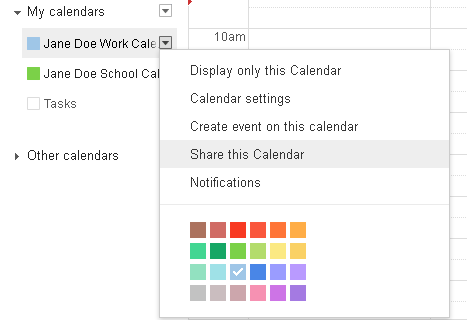

- You will be redirected to a new page. In the section titled Share with specific people, enter the email address of the person you would like to share your calendar with, select their Permission Settings and click Add Person. Click Save. Read More »
Personalize Your Gmail or Tnet Mail Background.
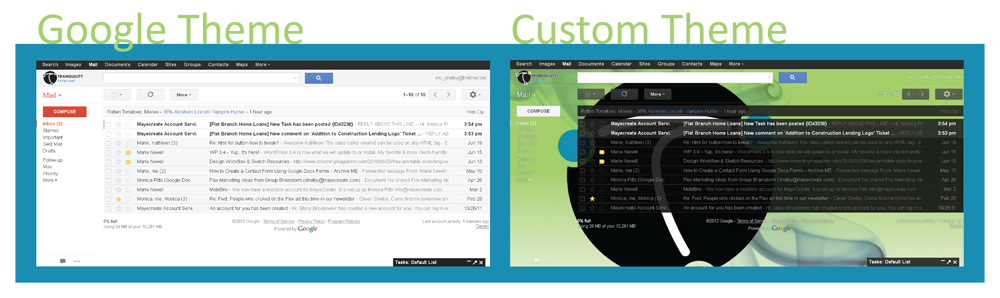
When you’re at work, you see your email inbox almost as often as your desktop. You couldn’t personalize your Gmail or Tnet Mail inbox background in the past, but now Google is allowing users to upload or link their own images to use as a background – similarly to your desktop. Impress your coworkers by following the steps below. Will you put a picture of your family as your inbox, or do you have any other special interests?
Meet Tyler Hayes, Our Newest Tech.
 If you drop by the Tranquility office or give us a call, you may hear a new voice telling you to have a nice day. This summer, we added a new tech to the office. His name is Tyler Hayes.
Tyler is a former New Yorker who came to Missouri three years ago. He has an Associate Degree in Information Technology and is currently a side-reporter for the local NBC station KOMU-TV. He has a passion for mobile technology and goes through mobile devices like it’s nobody’s business. He’s incredibly friendly and is always there to crack jokes and put smiles on people’s faces.
Come into Tranquility at 307 Locust today to meet Tyler. He and the rest of the team would be happy to take care of your Internet needs.
How Long Would it Take a Hacker to Crack Your Password?
When it comes to passwords, one thing is always true: The longer and more complex your password is the harder it is to crack. Hackers run possible password combinations through a program at 15 million combinations per second.
Use the graph below to see how long it would take a hacker to crack your password. Understand that there is a chance the hacker would only need half the time listed to actually crack your password.

If you want a second opinion, try HowSecureIsMyPassword.Net. It allows you to type in your password and gives you automatic feedback on how long it would take for the password to be hacked and if it is a “most used” password.
Different Devices Bring High-Speed, Wireless Internet to You.
At Tranquility Internet, we use a variety of devices to provide high-speed wireless Internet to our customers. The Franklin Wireless u310, GreenPacket MF250, Motorola i825 and Motorola o450 can provide you with a better connection and more mobility, but they each have their own use.
 Franklin Wireless u310: Mobile USB Device
The Franklin Wireless u310 can be inserted into the USB drive of any computer, which means it installs fast and is easy to use anywhere. This device works great in challenging architectural conditions for Internet reception. Under ideal conditions, it can perform at up to 15Mbps*.
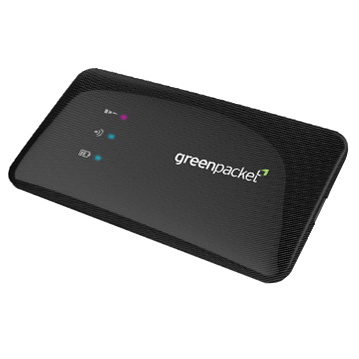 GreenPacket MF250: Mobile Router
The portable GreenPacket MF250 creates a mobile hotspot using 4G Wireless Broadband. It can host up to five devices securely at once and is small enough to fit in your pocket, which makes it great for impromptu meetings.
 Motorola i825: Stationary, Indoor Modem
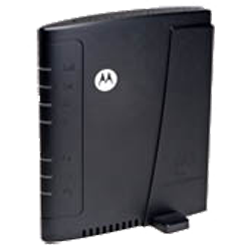
The Motorola i825 is a wireless broadband modem that is compatible with all computers. It has a firewall for security, which makes it great for residential use. This device performs at up to 12Mbps*.
 Motorola o450: Stationary, Outdoor Modem
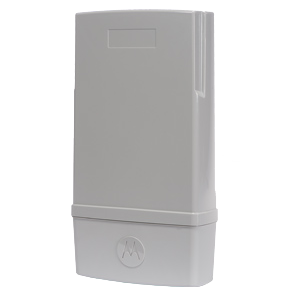
An outdoor broadband antenna, the Motorola 0450 provides Internet at greater distances-up to five miles. This makes it useful for operators wanting to extend the coverage of 4G networks at a low price. Under ideal conditions, speeds range between 8-15Mbps*.
*Quoted speeds are subject to actual usage conditions.
Eight Things You Should Know About Windows 8.
Windows 8 is very confrontational about its new features. A mere glance at the interface cues users in to the future identity of Windows. The yet unreleased operating system is an attempt at more integration, easier usage and better touchscreen compatibility. Here are eight things that everyone should know about the newest version of Windows:
1. There’s a start screen, not a start menu.
 A full-sized start screen has replaced the old stand-by start menu. When you log in, you will see an array of tiles. These tiles will display your contacts, the weather, a calendar preview, your favorite websites, your photos albums, etc. The content of the start screen is highly customizable, and you can organize and group your tiles. Like the start menu, the start screen has a section for promoted programs. However, the start menu only includes pinned programs rather than recently used programs in this list. That makes the menu more consistent. The tiles are updated in real time.
Read More »
Choose the Best Browser for Your Internet Needs.
Choosing an Internet browser can be overwhelming. There are constant technology breakthroughs and advocates of different browsers pulling consumers in all different directions. Below is a list of the top five most common web browsers with a summary of each. All browsers have their good and bad qualities. It’s just about finding what is right for you and your device. Read More »
We Will Never Ask for Your Username and Password.
 Posted:May. 5th, 2012 | In: Ask The Tech Guy, Email Fraud Alerts, News, Tips, Tranquility, Website Resources
 If you receive an email in your Tnetmail account asking for your username and password, do not reply.
Tranquility will never ask for your username or password, because we already know them. Some of our users have received such emails and replied with their username and password. If you send your information to these scammers they may be able to log into YOUR email and send out excessive amounts of mail. This puts your account and the accounts of other Tnetmail users at risk and slows down the mail delivery process for all.
Turn Your Email into a Document.
If you’ve ever copy and pasted an email into a document, you’ll love this little trick. You can convert your Tnetmail or Gmail emails into a Google document at the click of a button. If you want to take it one step further, you can even download the document onto your computer. Read through the steps to create this option for your account.
Give your account the ability.
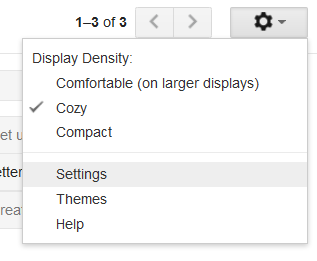
- Click on the wheel button in the upper right corner of your window. In the drop-down window, select Settings.
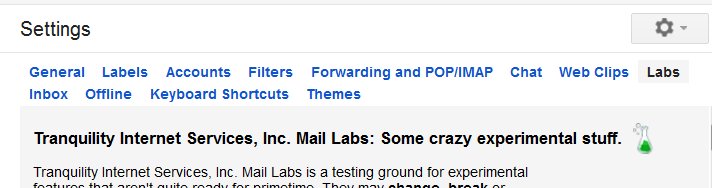
- From the menu across the top of the page, select Labs.
 Read More »
How Google’s New Privacy Policy Impacts Users.

Google’s new privacy policy has been in effect for over a month now, but there’s still some confusion surrounding the changes. In summary, all information will now be centralized for each user into a single profile. Before the new policy, each Google service-from Gmail to Google Scholar-had it’s own privacy terms.
Google provides a page describing and listing their new terms and policies on their website. To get a better understanding of how these changes affect users, though, it is important to look at both the benefits of the new policy and the harms. Read More »

More answers are
just a click away.
Browse the latest support articles at left, or if your question isn't covered in these topics, search our support center.
Ask The Tech Guy (39)
Dialup Setup (6)
Email Fraud Alerts (2)
Email Plus (2)
Email Setup (17)
Fiber (4)
How To (26)
Internet Dictionary (29)
T1/DS3 (3)
Tips (32)
Tnet Mail (17)
Web Hosting (3)
Website Resources (26)

We're a new kind of old school. We do house calls.
And business calls. If you'd rather save yourself some time and energy, we can come set up and fix stuff for you. Visit our remote support page for pricing information.
573-443-3983 |