Support Center
5 reasons to show up to our open house October 7th at 5.


Will I need a permit or zoning permission to install your modem or antenna?

Social Media Resources
Our sister company, MayeCreate, held a workshop on social media last week. From that workshop came a set of how-to guides, a handout and a Power Point discussing social networking statistics for various sites, frequency and more. Watch the workshop presentation or simply download the how to guides and handout by clicking the links below.
- Social Media Presentation Recap and Handout
- How to Create a Personal Facebook Account
- How to Make a Business Facebook Page
- How to Create a Linked in Profile
- How to Get Started with Twitter
The next MayeCreate workshop is “Get Found, 10 Things You Can do to Improve Google Rankings (SEO) on Your Own” go to the MayeCreate site and sign up online!
Click to learn about other upcoming MayeCreate workshops.
Google+
Ready to get out of the gossip ridden, mini-game filled, and SPAM covered cluster that has become the norm in social networking sites? There’s a new network in town that could clean all that up for us, Google+.
As of yet, Facebook and MySpace have dominated the field of social networking, and while MySpace fades away, Facebook has become a super power in terms of users (750 million active accounts.) Just as it appeared that Facebook had acquired a monopoly on social networking, Google has released it’s take on the social network. Google+ is the new social network on the block. Released in the last week of June, it is projected to already have over ten million users.
Alright, so maybe gossip will never leave the conversation, but wouldn’t it be nice if you could aim the gossip where it needed to hit? G+ took the idea of circles and forced it onto online networking. By keeping friends, close friends, work friends, family, extended family, acquaintances etc. separated, you don’t have the problem of discussing private matters with everyone you’ve ever met.
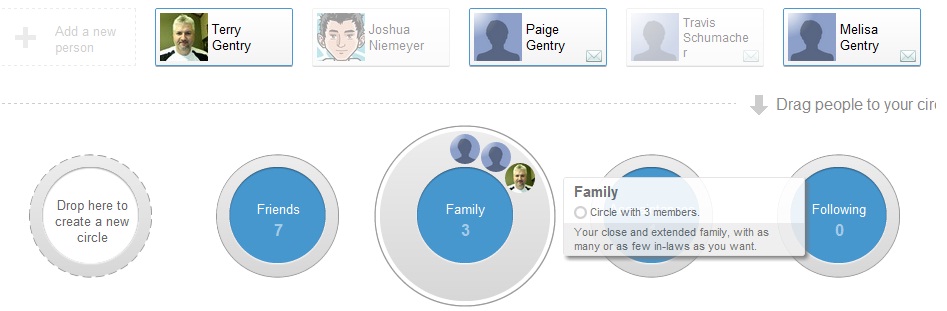
Organizing between Friends, Family, and Acquaintances has never been easier. You can simply drag relevant contacts into the circle of your choice. When posting updates, photos, or videos simply select one or more circle you want to share with.
Looking at your current online social network feed, how many notifications do you have concerning a mini-game? Odds are there are quite a few. And who are half these people? Google has focused social networking back to meaningful updates on your people’s lives.
While you were sifting through the mini-game queue, how many SPAM messages did you run into? If it looks anything like my page, quite a bit! Something handy about G+ is you have a handful of other online endeavors created by Google that hint at what you’re getting yourself into. For instance, look at Gmail, they’ve dominated the field with a minimalist style. They’ve done this with their search engine, messenger, reader, news etc. and Google+ will be the next installment in a long list of successful online outlets.
Sounds like something you’d like to be a part of doesn’t it? Now all you need to do is get invited!
No, We Don’t Want Your Username & Password… or Your Routing Number
From: “Admin@tranquility.net” <enquirie@administrativos.com>
Date: Fri, 15 Jul 2011 07:21:34
Reply-To: enquirie@administrativos.com
Subject: Email alert
Webnews From tranquility.net Customer Services This Message
from tranquility.net We want to alert you that we are
deleting all old email account to create more space for
the new account,To prevent your email account from being closed,
please give your.
Username:
Password:
tranquility.net Online Dept.
How to open jpegs in your browser.
- Right click on the file (either in your email or where ever you save it on your computer)
- Choose “Open With”
- Select your browser: Internet Explorer, FireFox, Chrome, etc.
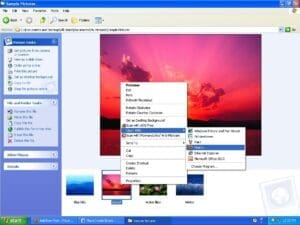
After the file has opened in your browser you may need to zoom in to view the design at its full size by clicking on the image. If you are having trouble please let us know because all computers and browsers are different.
Windows 7: 5 tips you should know.
Have you recently purchased a new computer running Windows 7? We’ve uncovered some quick tricks that are pretty handy for new Windows 7 users.
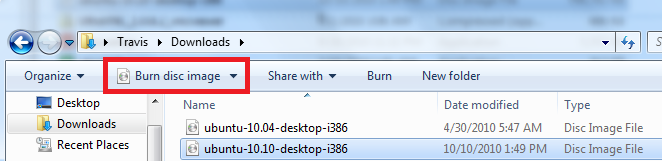
1. Burn ISO files right from explorer.
ISO files are images of complete CDs or DVDs compiled as one whole image file (*.iso). No need for any fancy burning software. Just select the ISO you’d like to burn a copy of and then click the “burn disc image” button.
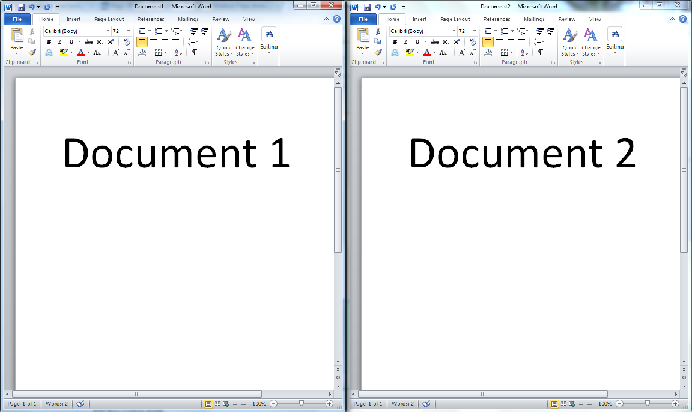
2. View windows side by side.
Just select the window that you’d like to view side by side, click the “windows” key and the left arrow. Then select the other window that you’d like to see and click the “windows” key and then the right arrow.
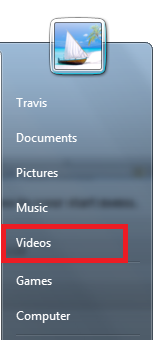
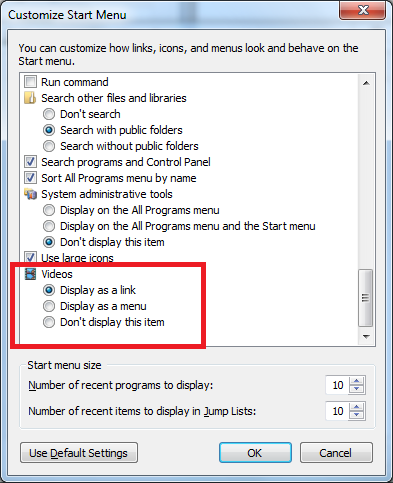
3. Add videos link to your start menu.
Just right click on the start button and click properties. Next click on the customize button and then select display as a link under videos.
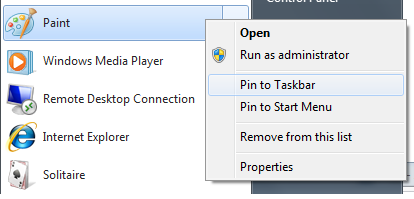
4. Pin frequently used programs or files to the task bar or start menu.
Just click start, find the program you’d like to pin, right click on it and then select where you’d like to pin it (start menu or the task bar).
5. Shake away the clutter.
If you have 18 different windows open and only want to see one select the window that you want to see with your mouse select the windows title bar hold the left mouse button down and shake the window.
You’ll notice that all of the other open windows have now been minimized! Oh and if you want all the windows open again just shake the same window again!
Is this email legit?
Have you ever received a message that looked legitimate but something was telling you, “Something just doesn’t seem right here?” Seems like everyone has. Here are a few general tips on how to decide if the message is legitimate or one that you should just delete.
RIP Windows XP Service Pack 2
If you haven’t upgraded to Service Pack 3 your computer is at risk.
Blogging is like vitamins for your website.
Will blogging help search engines find my website?
YES! Companies who blog get better search marketing results. Last August HubSpot.com conducted a survey of 1,531 customers, all small to medium sized businesses. 795 businesses blogged 736 did not. Those that blog have 55% more visitors to their sites, 97% more inbound links, links from other sites to theirs and 434% more indexed pages, pages recognized and cached by search engines. Here’s why.
- Keyword Steroids – Blogging adds keyword rich content to your site. Building posts, links and URLs using precious keywords. Plus, blogging usually involves words and terms grouped in a similar manner to audience searches because you’re addressing a topic for discussion not compiling marketing copy.
- Fresh Content – Updating your site consistently makes Googlebot and other search bots into your allies. Regularly posting quality on topic content increases the number of bot visits resulting in more indexed pages.
- Return Viewers – Blogging gives visitors a reason to return building a reputation for your website as an informational resource. Comments and trackback features in blog software encourage interaction.
- Link Building Boost – Useful articles are well read and encourage others to link to your blog on their site, using social media or though RSS, creating more inbound links to your site.
- Naturally Search Friendly – Most blogging software has search friendly site architecture. Clear navigation, uncomplicated URL structure and correct linking practices make it easy for the search engines to crawl your site and index content.
This article is also published in Columbia Woman magazine!

More answers are
just a click away.
Browse the latest support articles at left, or if your question isn't covered in these topics, search our support center.
Ask The Tech Guy (39)
Dialup Setup (6)
Email Fraud Alerts (2)
Email Plus (2)
Email Setup (17)
Fiber (4)
How To (26)
Internet Dictionary (29)
T1/DS3 (3)
Tips (32)
Tnet Mail (17)
Web Hosting (3)
Website Resources (26)

We're a new kind of old school. We do house calls.
And business calls. If you'd rather save yourself some time and energy, we can come set up and fix stuff for you. Visit our remote support page for pricing information.
573-443-3983 |